Founding offer: lifetime access for a one-time $399 — 10 companies only →
FIELD MANUAL FOR ELECTRICAL CONTRACTORS
GET CLEAN HOURS FROM YOUR CREW. GET INVOICES YOUR CUSTOMERS DON’T FIGHT.
A T&M invoice asks your customer to take your word for it. The charge was fair — the explanation was missing. One line from the field about what got done turns an hours total into hours they can follow: who, where, how long, on what.
Packet: no signup · Trial: $99/mo + $8/worker, no credit card
01 / THE CONVERSATION
“THREE GUYS FOR TWO DAYS. ON WHAT?”
THE CHARGE WAS FAIR. THE EXPLANATION WAS MISSING.
Your customer isn't accusing you of anything. They're looking at a number they can't reconstruct. A T&M invoice asks them to take your word for it, and when they can't follow the charge they don't conclude that they're wrong — they conclude they're being padded. From there you either discount work you actually performed, or you win the argument and lose the relationship.
What comes back instead of a payment
“Three guys for two days? On what?”
You rebuild the week from memory and hope the dates hold up.
“Why am I paying for someone to drive to the supply house?”
A legitimate charge you now defend line by line.
“This is way more than you told me.”
The estimate conversation, again, after the work is done.
Then there's the invoice sitting 30 days out because nobody wants to make the call, and the $400 written off to keep a customer on a job that was billed correctly. None of that shows up as a loss anywhere in your books. It shows up as a slow month.
You find out after the job is over
Labor cost that arrives with the final invoice is history, not information. Without it landing as the hours land, the next estimate is a guess dressed up as a number.
The January 1099 scramble
Subcontractor totals mean reassembling a year of spreadsheets and receipts in one week. Hours tied to the sub who worked them are already added up.
Our arithmetic on our assumptions — not your books. All four inputs are yours to change in the calculator. And unbilled hours are only the part you can count. The discount you hand over to end an argument is the part you can't.
02 / THE ANSWER
THE LINE YOUR CREW WRITES IS THE LINE YOUR CUSTOMER READS
Same hours. Same charge. One of them ends the conversation. A record that reads “8.77 hrs” asks your customer to trust you. A record that names the day, the window, and the work answers the question before it gets asked — and there's nothing left to negotiate.
It's also the only version your crew has a reason to go along with. “Clock in so I can check on you” gets resistance, and it should. “Write one line so nobody can chisel us on this invoice” puts them on your side of the argument. Ten seconds at the truck, and the record protects the electrician who made it.
What a timesheet says
8.77 hrs
Loses the argument.
What an answer says
THU 7:02a–3:48p
Pulled and terminated circuits 12–18, second-floor east wing.
Ends it.
03 / THE CAPTURE
ONE TAP. THEY'RE CLOCKED IN.
Your crew opens their phone browser, picks a job, and taps one button. That's it. No app to download. No passwords to forget. Works offline on rural job sites and syncs when signal comes back. Average clock-in time: 5 seconds. Even the guy who still has a flip phone can figure this out.
Your Crew Clocks In
One tap from their phone. Takes 5 seconds. Works offline in basements and rural job sites.
One Tap. No Training.
Your crew clocks in from their phone in 5 seconds. No app download. No training. If they can text, they can use FieldTimesheet.
Works in Basements
No signal in that basement? Entries save offline and sync when they surface. Never lose a clock-in again.
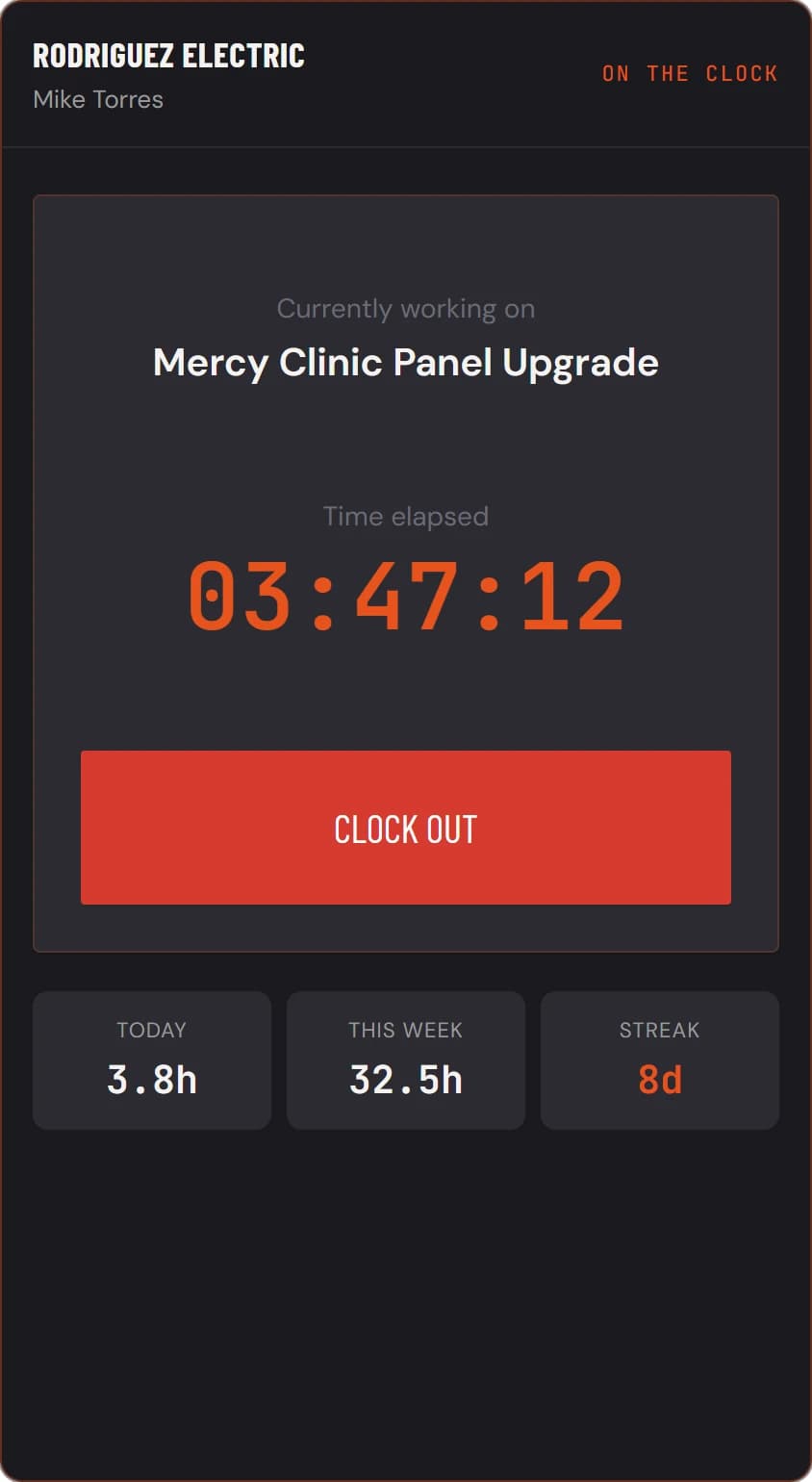
Actual clock screen — mid-shift
04 / THE RECONCILE
HOURS LAND IN QUICKBOOKS WITHOUT ANYONE RETYPING THEM
Every completed entry pushes to QuickBooks Online as a TimeActivity: the worker, the date, the hours, and the electrician's own clock-out note as the description. Your bookkeeper opens structured records Monday morning instead of a shoebox full of scribbled timesheets. No CSV exports. No copy-paste. No double entry.
QuickBooks in 60 Seconds
Connecting takes about a minute. After that, sending a week of entries is one click from the Time page.
One Way, On Your Click
The sync pushes time out; it never pulls anything back, so you add your jobs here and set the service item and rate in QuickBooks when you build the invoice.
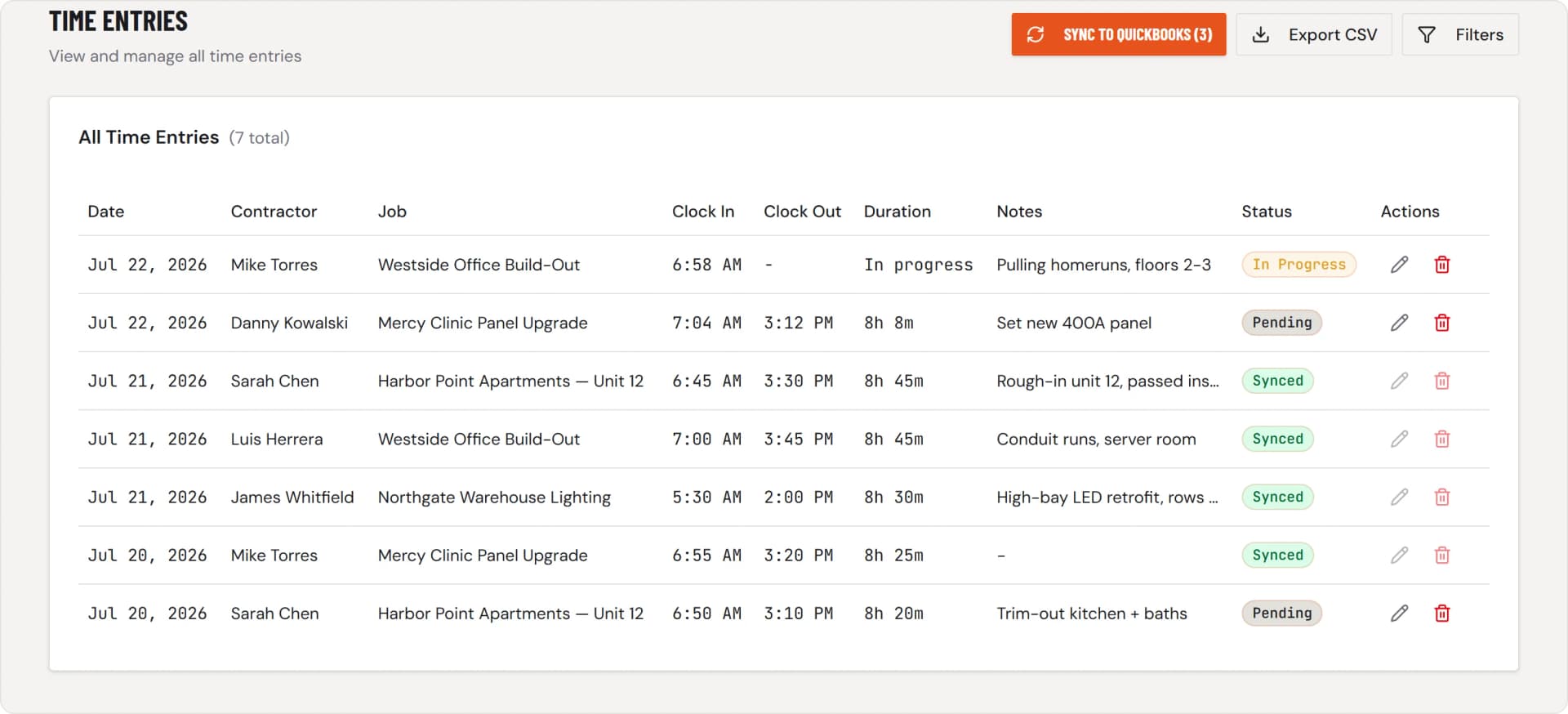
Actual time page — one click to QuickBooks
05 / THE MARGIN
KNOW YOUR LABOR COST BEFORE THE JOB IS OVER
Most contractors find out they lost money on a job after the final invoice. FieldTimesheet shows you labor cost against budget in real time. If a $12,000 job is burning through hours too fast, you see it at 60% complete, not at 100%. Catch overruns before they eat your margin, not after.
See Where Hours Go
Every hour tied to a job and customer. Finally know which jobs eat your labor and which ones make you money.
Bid Smarter Next Time
See labor vs budget in real-time. Know if you are over budget before the job ends. Bid smarter on the next one.
Track Every Sub's Hours
Every hour tied to the contractor who worked it. When January comes, the numbers are already done.
$99/MO + $8/WORKER
Up to 10 workers on the base plan. No credit card to start. Cancel anytime.
First 10 companies: lifetime access for a one-time $399 →
Example: A crew of 15 workers = $99 + (5 × $8) = $139/month
Prefer annual? $990/yr for up to 10 workers — 2 months free. Pick it at checkout.
Want to run the arithmetic on your own crew? Change the four inputs in the calculator.
Common Questions
Everything you need to know before getting started
How do I show a customer what they're being charged for?
Put the work next to the hours. A line that reads “8.77 hrs” asks the customer to take your word for it. A line that reads “Thu 7:02a–3:48p — pulled and terminated circuits 12–18, second-floor east wing” answers the question before it gets asked. That's a documentation habit before it's a software purchase: the sample billing packet shows the format with no signup, and the T&M backup templates work on paper if you never buy anything.
My crew isn't tech-savvy. Will they actually use this?
If they can open a text message, they can clock in with FieldTimesheet. There's no app to download — just tap a link on their phone. One tap to clock in, one tap to clock out. There's nothing to learn and no training to run.
What happens after the 14-day trial?
You'll get a reminder before it ends. If you love it, enter payment details to continue. If not, no charge—your data stays for 30 days in case you change your mind.
Can I cancel anytime?
Yes. No contracts. No long-term commitments. Cancel anytime with one click. Download your time entries, jobs, and contractor data as CSV anytime from Settings.
Does this track my crew's location all day?
No. FieldTimesheet captures GPS only at the moment of clock-in and clock-out — like a digital timestamp on a punch card. No continuous tracking during the day, no breadcrumb trail. It's there to verify job site arrivals, not to monitor your crew's every move.
Does this replace QuickBooks?
No. FieldTimesheet connects to QuickBooks Online and pushes completed time entries there as TimeActivity records when you run the sync. You still use QuickBooks for invoicing, expenses, payroll, and reports. We handle time tracking so you do not have to type it in twice.
Do I need QuickBooks to use FieldTimesheet?
No. Time tracking, job costing, printable signed timesheets, and CSV export all work on their own — the CSV includes rates and labor costs and imports into any accounting software. QuickBooks sync is optional, and it's one click when you're ready.
Isn't time tracking software expensive for a small team?
Most time tracking apps charge high base fees plus per-user pricing for features you'll never touch. FieldTimesheet is $99/month for up to 10 workers — no forced upgrades, no feature bloat. If a 10-person crew saves even one missed hour per week at $75/hr, the app pays for itself more than 3x over.
Do my workers need to download an app?
No. FieldTimesheet works in any web browser (Chrome, Safari, etc.). They just tap a link and clock in. Bookmark it to their home screen if they want the app-like experience.
What if they are in a basement with no signal?
Entries save offline and sync when they get back to WiFi or cell signal. We built this specifically for construction sites where connectivity is spotty.
What if I'm not technical?
If you can use QuickBooks, you can use FieldTimesheet. Setup takes about 5 minutes. Plus, you can call us anytime for help.
Is my data secure?
Absolutely. We use 256-bit SSL encryption (same as banks) and your data is backed up daily. We never sell or share your information.
Can I import existing jobs from QuickBooks?
No. The sync runs one way — time goes out to QuickBooks, nothing is pulled back in — so you add your active jobs in FieldTimesheet yourself. For a typical active job list that is a few minutes of typing, once.
What kind of support do you offer?
Call (682) 587-9876 or email support@fieldtimesheet.com. Real people who know the product — no ticket runaround.
Paper timesheets work fine for us. Why switch?
Paper feels free until a lost sheet or fudged hour costs you $500. About 40% of contractors still use paper, but they quietly lose money to missing hours, rounding errors, and the hours spent chasing late cards every pay period. FieldTimesheet pays for itself by capturing those leaks.
STOP DISCOUNTING WORK YOU ACTUALLY DID
FieldTimesheet is new, so there are no customer logos to show you. Judge the output instead. The sample billing packet is a full job labor report and weekly timesheet, annotated to show why each line ends a dispute. No signup, nothing to cancel.
No credit card. 5-minute setup. Cancel anytime.